

[Feb 21, 2025] Latest N10-009 PDF Dumps & Real Tests Free Updated Today
N10-009 Dumps With 100% Verified Q&As - Pass Guarantee or Full Refund
NEW QUESTION # 76
Before using a guest network, an administrator requires users to accept the terms of use Which of the following is the best way to accomplish this goal?
- A. Captive portal
- B. Pre-shared key
- C. WPA2 encryption
- D. Autonomous access point
Answer: A
Explanation:
A captive portal is a web page that users must view and interact with before being granted access to a network. It is commonly used in guest networks to enforce terms of use agreements. When a user connects to the network, they are redirected to this portal where they must accept the terms of use before proceeding. This method ensures that users are aware of and agree to the network's policies, making it the best choice for this scenario. Reference: CompTIA Network+ Exam Objectives and official study guides.
NEW QUESTION # 77
After running a Cat 8 cable using passthrough plugs, an electrician notices that connected cables are experiencing a lot of cross talk. Which of the following troubleshooting steps should the electrician take first?
- A. Inspect the connectors for any wires that are touching or exposed.
- B. Check for radio frequency interference in the area.
- C. Restore default settings on the connected devices.
- D. Terminate the connections again.
Answer: A
Explanation:
Cross talk can often be caused by improper termination of cables. The first step in troubleshooting should be to inspect the connectors for any wires that might be touching or exposed. Ensuring that all wires are correctly seated and that no conductors are exposed can help reduce or eliminate cross talk. This step should be taken before attempting to re-terminate the connections or check for other sources of interference.References:CompTIA Network+ study materials.
NEW QUESTION # 78
Which of the following allows a remote user to connect to the network?
- A. API gateway
- B. Client-to-site VPN
- C. Command-line interface
- D. Jump box
Answer: B
Explanation:
Explanation: A Client-to-Site VPN allows a remote user to securely connect to a company's internal network, providing access as if they were physically on-site.
NEW QUESTION # 79
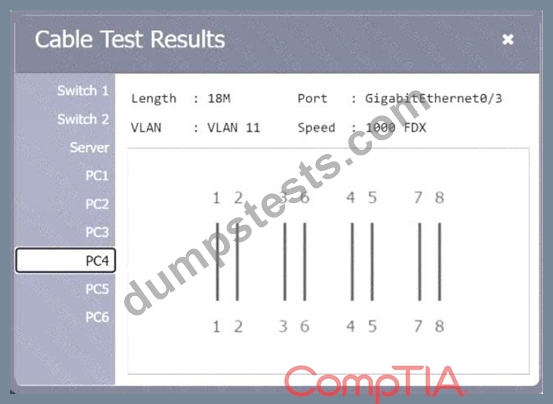
A network technician needs to resolve some issues with a customer's SOHO network. The customer reports that some of the PCs are not connecting to the network, while others appear to be working as intended.
INSTRUCTIONS
Troubleshoot all the network components.
Review the cable test results first, then diagnose by clicking on the appropriate PC, server, and Layer 2 switch.
Identify any components with a problem and recommend a solution to correct each problem.
If at any time you would like to bring back
the initial state of the simulation, please
click the Reset All button.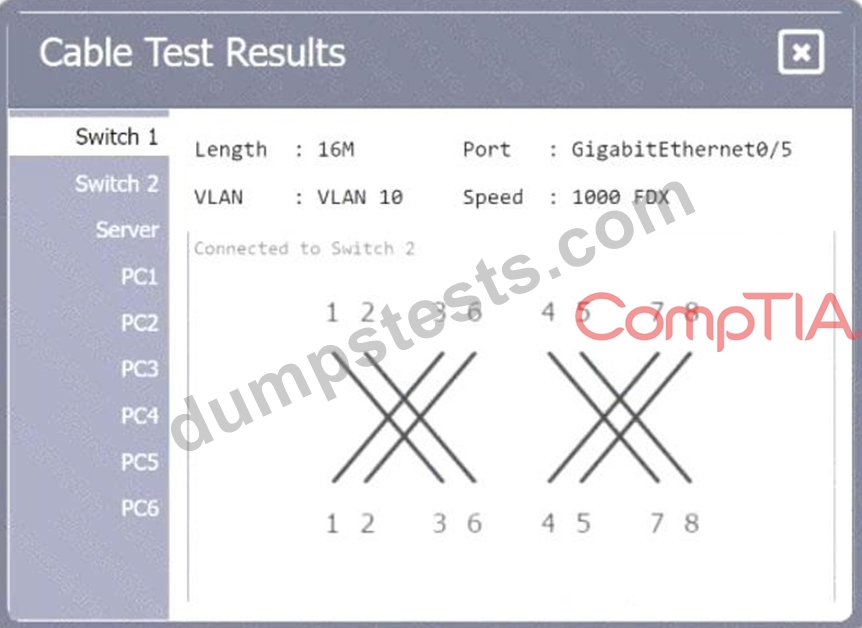




Answer:
Explanation:
See the answer and solution below:
NEW QUESTION # 80
You have been tasked with implementing an ACL on the router that will:
1. Permit the most commonly used secure remote access technologies from the management network to all other local network segments
2. Ensure the user subnet cannot use the most commonly used remote access technologies in the Linux and Windows Server segments.
3. Prohibit any traffic that has not been specifically allowed.
INSTRUCTIONS
Use the drop-downs to complete the ACL
If at any time you would like to bring back the initial state of the simulation, please click the Reset All button.

Answer:
Explanation:
See the answer and solution below.
Explanation:
NEW QUESTION # 81
A network technician is examining the configuration on an access port and notices more than one VLAN has been set. Which of the following best describes how the port is configured?
- A. With too many VLANs
- B. With a default VLAN
- C. With a native VLAN
- D. With a voice VLAN
Answer: D
Explanation:
Explanation: It is common for an access port to have both a voice VLAN and a data VLAN. A voice VLAN separates voice traffic from regular data traffic, ensuring better quality and security for voice communications.
NEW QUESTION # 82
A company's marketing team created a new application and would like to create a DNS record for newapplication.comptia.org that always resolves to the same address as www.comptia.org. Which of the following records should the administrator use?
- A. SOA
- B. CNAME
- C. MX
- D. NS
Answer: B
Explanation:
A CNAME (Canonical Name) record is used in DNS to alias one domain name to another. This means that newapplication.comptia.org can be made to resolve to the same IP address aswww.comptia.orgby creating a CNAME record pointing newapplication.comptia.org towww.comptia.org. SOA (Start of Authority) is used for DNS zone information, MX (Mail Exchange) is for mail server records, and NS (Name Server) is for specifying authoritative DNS servers.
NEW QUESTION # 83
Which of the following IP transmission types encrypts all of the transmitted data?
- A. UDP
- B. GRE
- C. ESP
- D. TC
P - E. AH
Answer: C
Explanation:
* Definition of ESP (Encapsulating Security Payload):
* ESP is a part of the IPsec protocol suite used to provide confidentiality, integrity, and authenticity of data. ESP encrypts the payload and optional ESP trailer, providing data confidentiality.
* ESP Functionality:
* ESP can encrypt the entire IP packet, ensuring that the data within the packet is secure from interception or eavesdropping. It also provides options for data integrity and authentication.
* ESP operates in two modes: transport mode (encrypts only the payload of the IP packet) and tunnel mode (encrypts the entire IP packet).
* Comparison with Other Protocols:
* AH (Authentication Header):Provides data integrity and authentication but does not encrypt the payload.
* GRE (Generic Routing Encapsulation):A tunneling protocol that does not provide encryption.
* UDP (User Datagram Protocol) and TCP (Transmission Control Protocol):These are transport layer protocols that do not inherently provide encryption. Encryption must be provided by additional protocols like TLS/SSL.
* Use Cases:
* ESP is widely used in VPNs (Virtual Private Networks) to ensure secure communication over untrusted networks like the internet.
References:
* CompTIA Network+ study materials on IPsec and encryption.
NEW QUESTION # 84
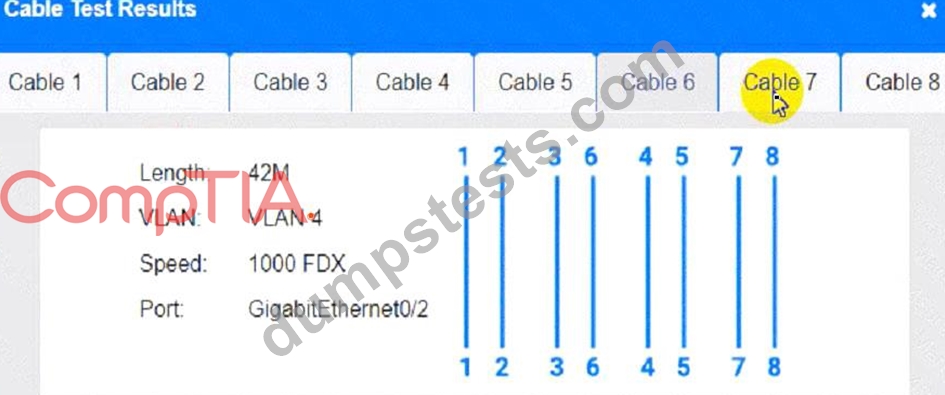
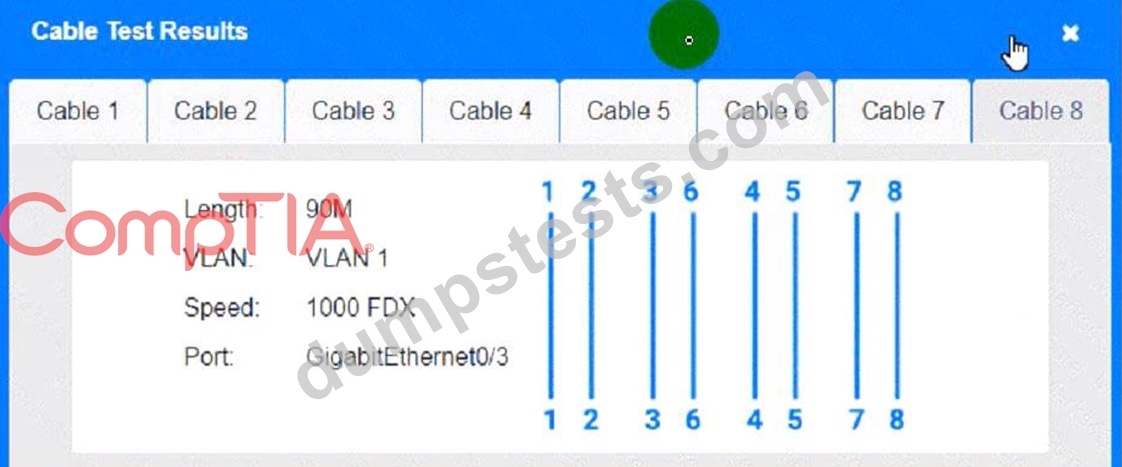
A network technician needs to resolve some issues with a customer's SOHO network.
The customer reports that some of the devices are not connecting to the network, while others appear to work as intended.
INSTRUCTIONS
Troubleshoot all the network components and review the cable test results by Clicking on each device and cable.
Diagnose the appropriate component(s) by identifying any components with a problem and recommend a solution to correct each problem.


Cable Test Results:
Cable 1:
Cable 2:
Cable 3:
Cable 4:




Answer:
Explanation:
See the Explanation for detailed information on this simulation.
Explanation:
(Note: Ips will be change on each simulation task, so we have given example answer for the understanding) To troubleshoot all the network components and review the cable test results, you can use the following steps:
* Click on each device and cable to open its information window.
* Review the information and identify any problems or errors that may affect the network connectivity or performance.
* Diagnose the appropriate component(s) by identifying any components with a problem and recommend a solution to correct each problem.
* Fill in the remediation form using the drop-down menus provided.
Here is an example of how to fill in the remediation form for PC1:
* The component with a problem is PC1.
* The problem is Incorrect IP address.
* The solution is Change the IP address to 192.168.1.10.
You can use the same steps to fill in the remediation form for other components.
To enter commands in each device, you can use the following steps:
* Click on the device to open its terminal window.
* Enter the command ipconfig /all to display the IP configuration of the device, including its IP address, subnet mask, default gateway, and DNS servers.
* Enter the command ping <IP address> to test the connectivity and reachability to another device on the network by sending and receiving echo packets. Replace <IP address> with the IP address of the destination device, such as 192.168.1.1 for Core Switch 1.
* Enter the command tracert <IP address> to trace the route and measure the latency of packets from the device to another device on the network by sending and receiving packets with increasing TTL values.
Replace <IP address> with the IP address of the destination device, such as 192.168.1.1 for Core Switch 1.
Here is an example of how to enter commands in PC1:
* Click on PC1 to open its terminal window.
* Enter the command ipconfig /all to display the IP configuration of PC1. You should see that PC1 has an incorrect IP address of 192.168.2.10, which belongs to VLAN 2 instead of VLAN 1.
* Enter the command ping 192.168.1.1 to test the connectivity to Core Switch 1. You should see that PC1 is unable to ping Core Switch 1 because they are on different subnets.
* Enter the command tracert 192.168.1.1 to trace the route to Core Switch 1. You should see that PC1 is unable to reach Core Switch 1 because there is no route between them.
You can use the same steps to enter commands in other devices, such as PC3, PC4, PC5, and Server 1.
NEW QUESTION # 85
Which of the following can support a jumbo frame?
- A. Access point
- B. Bridge
- C. Hub
- D. Switch
Answer: D
Explanation:
* Definition of Jumbo Frames:
* Jumbo frames are Ethernet frames with more than 1500 bytes of payload, typically up to 9000 bytes. They are used to improve network performance by reducing the overhead caused by smaller frames.
* Why Switches Support Jumbo Frames:
* Switches are network devices designed to manage data packets and can be configured to support jumbo frames. This capability enhances throughput and efficiency, particularly in high-performance networks and data centers.
* Incompatibility of Other Devices:
* Access Point: Primarily handles wireless communications and does not typically support jumbo frames.
* Bridge: Connects different network segments but usually operates at standard Ethernet frame sizes.
* Hub: A simple network device that transmits packets to all ports without distinguishing between devices, incapable of handling jumbo frames.
* Practical Application:
* Enabling jumbo frames on switches helps in environments where large data transfers are common, such as in storage area networks (SANs) or large-scale virtualized environments.
References:
* CompTIA Network+ course materials and networking hardware documentation.
NEW QUESTION # 86
Which of the following is used to estimate the average life span of a device?
- A. MTBF
- B. RTO
- C. RPO
- D. MTTR
Answer: A
Explanation:
Understanding MTBF:
Mean Time Between Failures (MTBF): A reliability metric that estimates the average time between successive failures of a device or system.
Calculation and Importance:
Calculation: MTBF is calculated as the total operational time divided by the number of failures during that period.
Usage: Used by manufacturers and engineers to predict the lifespan and reliability of a device, helping in maintenance planning and lifecycle management.
Comparison with Other Metrics:
RTO (Recovery Time Objective): The maximum acceptable time to restore a system after a failure.
RPO (Recovery Point Objective): The maximum acceptable amount of data loss measured in time.
MTTR (Mean Time to Repair): The average time required to repair a device or system and return it to operational status.
Application:
MTBF is crucial for planning maintenance schedules, spare parts inventory, and improving the overall reliability of systems.
Reference:
CompTIA Network+ study materials on reliability and maintenance metrics.
NEW QUESTION # 87
A network administrator is connecting two Layer 2 switches in a network. These switches must transfer data in multiple networks. Which of the following would fulfill this requirement?
- A. Link aggregation
- B. Jumbo frames
- C. 802.1Q tagging
- D. Native VLAN
Answer: C
NEW QUESTION # 88
A network administrator wants to implement security zones in the corporate network to control access to only individuals inside of the corporation. Which of the following security zones is the best solution?
- A. Extranet
- B. VPN
- C. Trusted
- D. Public
Answer: C
Explanation:
* Introduction to Security Zones:
* Security zones are logical segments within a network designed to enforce security policies and control access. They help in segregating and securing different parts of the network.
* Types of Security Zones:
* Trusted Zone:This is the most secure zone, typically used for internal corporate networks where only trusted users have access.
* Extranet:This zone allows controlled access to external partners, vendors, or customers.
* VPN (Virtual Private Network):While VPNs are used to create secure connections over the internet, they are not a security zone themselves.
* Public Zone:This zone is the least secure and is typically used for public-facing services accessible by anyone.
* Trusted Zone Implementation:
* The trusted zone is configured to include internal corporate users and resources. Access controls,
* firewalls, and other security measures ensure that only authorized personnel can access this zone.
* Internal network segments, such as the finance department, HR, and other critical functions, are usually placed in the trusted zone.
* Example Configuration:
* Firewall Rules:Set up rules to allow traffic only from internal IP addresses.
* Access Control Lists (ACLs):Implement ACLs on routers and switches to restrict access based on IP addresses and other criteria.
* Segmentation:Use VLANs and subnetting to segment and isolate the trusted zone from other zones.
* Explanation of the Options:
* A. Extranet:Suitable for external partners, not for internal-only access.
* B. Trusted:The correct answer, as it provides controlled access to internal corporate users.
* C. VPN:A method for secure remote access, not a security zone itself.
* D. Public:Suitable for public access, not for internal corporate users.
* Conclusion:
* Implementing a trusted zone is the best solution for controlling access within a corporate network.
It ensures that only trusted internal users can access sensitive resources, enhancing network security.
References:
* CompTIA Network+ guide detailing security zones and their implementation in a corporate network (see pageRef 9†Basic Configuration Commands).
NEW QUESTION # 89
SIMULATION
Users are unable to access files on their department share located on flle_server 2. The network administrator has been tasked with validating routing between networks hosting workstation A and file server 2.
INSTRUCTIONS
Click on each router to review output, identity any Issues, and configure the appropriate solution If at any time you would like to bring back the initial state of trie simulation, please click the reset All button;

Answer:
Explanation:
See the solution configuration below in Explanation.


NEW QUESTION # 90
SIMULATION
A network administrator has been tasked with configuring a network for a new corporate office. The office consists of two buildings, separated by 50 feet with no physical connectivity. The configuration must meet the following requirements:
. Devices in both buildings should be
able to access the Internet.
. Security insists that all Internet traffic
be inspected before entering the
network.
. Desktops should not see traffic
destined for other devices.
INSTRUCTIONS
Select the appropriate network device for each location. If applicable, click on the magnifying glass next to any device which may require configuration updates and make any necessary changes.
Not all devices will be used, but all locations should be filled.
If at any time you would like to bring back the initial state of the simulation, please click the Reset All button.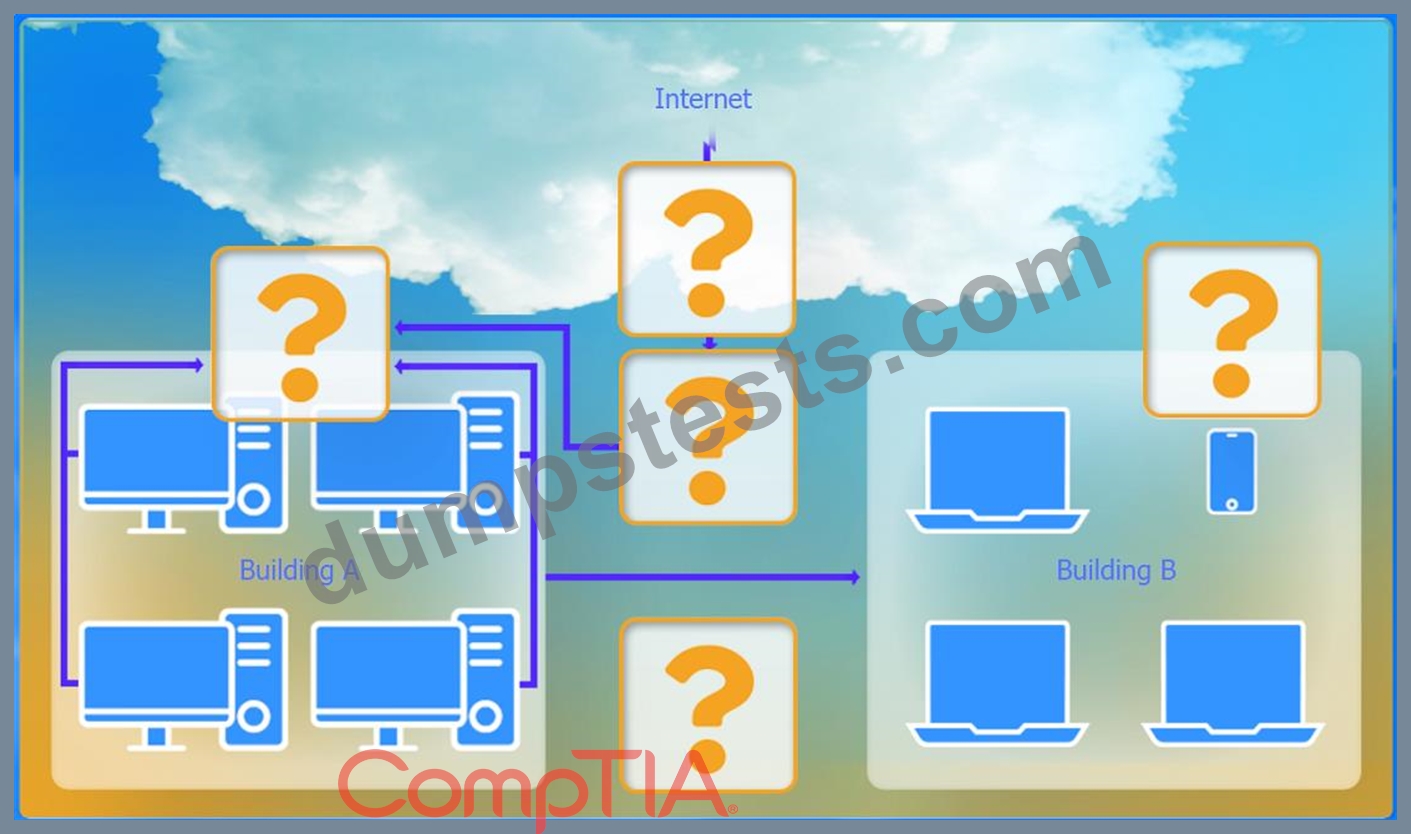


Answer:
Explanation:
See the answer and solution below
Explanation:
Devices in both buildings should be able to access the Internet.
Security insists that all Internet traffic be inspected before entering the network.
Desktops should not see traffic destined for other devices.
Here is the corrected layout with explanation:
Building A:
Switch: Correctly placed to connect all desktops.
Firewall: Correctly placed to inspect all incoming and outgoing traffic.
Building B:
Switch: Not needed. Instead, place a Wireless Access Point (WAP) to provide wireless connectivity for laptops and mobile devices.
Between Buildings:
Wireless Range Extender: Correctly placed to provide connectivity between the buildings wirelessly.
Connection to the Internet:
Router: Correctly placed to connect to the Internet and route traffic between the buildings and the Internet.
Firewall: The firewall should be placed between the router and the internal network to inspect all traffic before it enters the network.
Corrected Setup:
Top-left (Building A): Switch
Bottom-left (Building A): Firewall (inspect traffic before it enters the network) Top-middle (Internet connection): Router Bottom-middle (between buildings): Wireless Range Extender Top-right (Building B): Wireless Access Point (WAP) In this corrected setup, the WAP in Building B will connect wirelessly to the Wireless Range Extender, which is connected to the Router. The Router is connected to the Firewall to ensure all traffic is inspected before it enters the network.
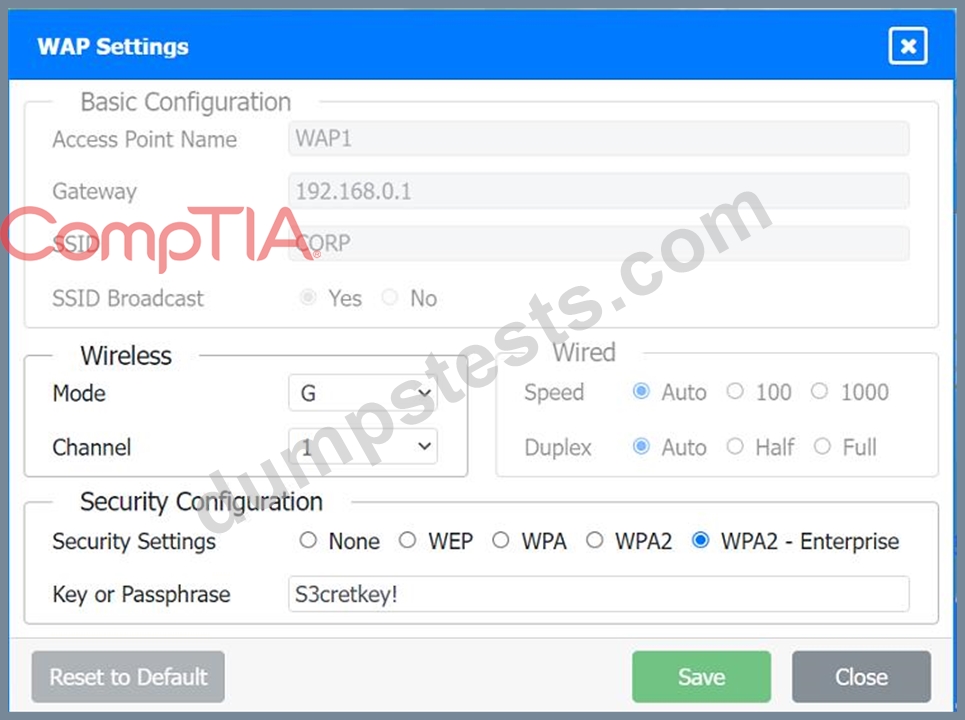
Configuration for Wireless Range Extender:
SSID: CORP
Security Settings: WPA2 or WPA2 - Enterprise
Key or Passphrase: [Enter a strong passphrase]
Mode: [Set based on your network plan]
Channel: [Set based on your network plan]
Speed: Auto
Duplex: Auto
With these settings, both buildings will have secure access to the Internet, and all traffic will be inspected by the firewall before entering the network. Desktops and other devices will not see traffic intended for others, maintaining the required security and privacy.
To configure the wireless range extender for security, follow these steps:
SSID (Service Set Identifier):
Ensure the SSID is set to "CORP" as shown in the exhibit.
Security Settings:
WPA2 or WPA2 - Enterprise: Choose one of these options for stronger security. WPA2-Enterprise provides more robust security with centralized authentication, which is ideal for a corporate environment.
Key or Passphrase:
If you select WPA2, enter a strong passphrase in the "Key or Passphrase" field.
If you select WPA2 - Enterprise, you will need to configure additional settings for authentication servers, such as RADIUS, which is not shown in the exhibit.
Wireless Mode and Channel:
Set the appropriate mode and channel based on your network design and the environment to avoid interference. These settings are not specified in the exhibit, so set them according to your network plan.
Wired Speed and Duplex:
Set the speed to "Auto" unless you have specific requirements for 100 or 1000 Mbps.
Set the duplex to "Auto" unless you need to specify half or full duplex based on your network equipment.
Save Configuration:
After making the necessary changes, click the "Save" button to apply the settings.
Here is how the configuration should look after adjustments:
SSID: CORP
Security Settings: WPA2 or WPA2 - Enterprise
Key or Passphrase: [Enter a strong passphrase]
Mode: [Set based on your network plan]
Channel: [Set based on your network plan]
Speed: Auto
Duplex: Auto
Once these settings are configured, your wireless range extender will provide secure connectivity for devices in both buildings.
Firewall setting to to ensure complete compliance with the requirements and best security practices, consider the following adjustments and additions:
DNS Rule: This rule allows DNS traffic from the internal network to any destination, which is fine.
HTTPS Outbound: This rule allows HTTPS traffic from the internal network (assuming 192.169.0.1/24 is a typo and should be 192.168.0.1/24) to any destination, which is also good for secure web browsing.
Management: This rule allows SSH access to the firewall for management purposes, which is necessary for administrative tasks.
HTTPS Inbound: This rule denies inbound HTTPS traffic to the internal network, which is good unless you have a web server that needs to be accessible from the internet.
HTTP Inbound: This rule denies inbound HTTP traffic to the internal network, which is correct for security purposes.
Suggested Additional Settings:
Permit General Outbound Traffic: Allow general outbound traffic for web access, email, etc.
Block All Other Traffic: Ensure that all other traffic is blocked to prevent unauthorized access.
Firewall Configuration Adjustments:
Correct the Network Typo:
Ensure that the subnet 192.169.0.1/24 is corrected to 192.168.0.1/24.
Permit General Outbound Traffic:
Rule Name: General Outbound
Source: 192.168.0.1/24
Destination: ANY
Service: ANY
Action: PERMIT
Deny All Other Traffic:
Rule Name: Block All
Source: ANY
Destination: ANY
Service: ANY
Action: DENY
Here is how your updated firewall settings should look:
Rule Name
Source
Destination
Service
Action
DNS Rule
192.168.0.1/24
ANY
DNS
PERMIT
HTTPS Outbound
192.168.0.1/24
ANY
HTTPS
PERMIT
Management
ANY
192.168.0.1/24
SSH
PERMIT
HTTPS Inbound
ANY
192.168.0.1/24
HTTPS
DENY
HTTP Inbound
ANY
192.168.0.1/24
HTTP
DENY
General Outbound
192.168.0.1/24
ANY
ANY
PERMIT
Block All
ANY
ANY
ANY
DENY
These settings ensure that:
Internal devices can access DNS and HTTPS services externally.
Management access via SSH is permitted.
Inbound HTTP and HTTPS traffic is denied unless otherwise specified.
General outbound traffic is allowed.
All other traffic is blocked by default, ensuring a secure environment.
Make sure to save the settings after making these adjustments.
NEW QUESTION # 91
SIMULATION
You have been tasked with setting up a wireless network in an office. The network will consist of 3 Access Points and a single switch. The network must meet the following parameters:
The SSIDs need to be configured as CorpNet with a key of S3cr3t!
The wireless signals should not interfere with each other
The subnet the Access Points and switch are on should only support 30 devices maximum The Access Points should be configured to only support TKIP clients at a maximum speed INSTRUCTONS Click on the wireless devices and review their information and adjust the settings of the access points to meet the given requirements.
If at any time you would like to bring back the initial state of the simulation, please click the Reset All button.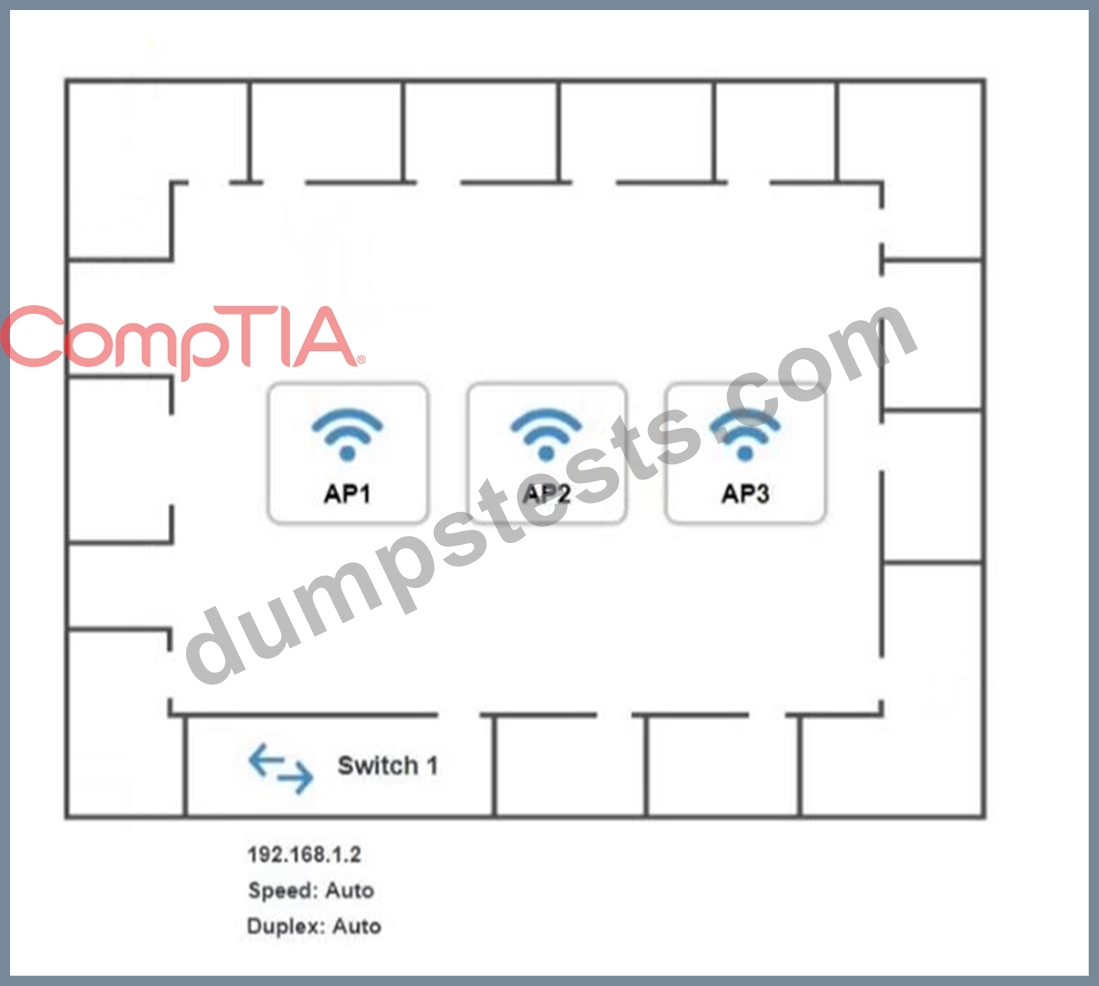


Answer:
Explanation:
See explanation below
Explanation:
On the first exhibit, the layout should be as follows


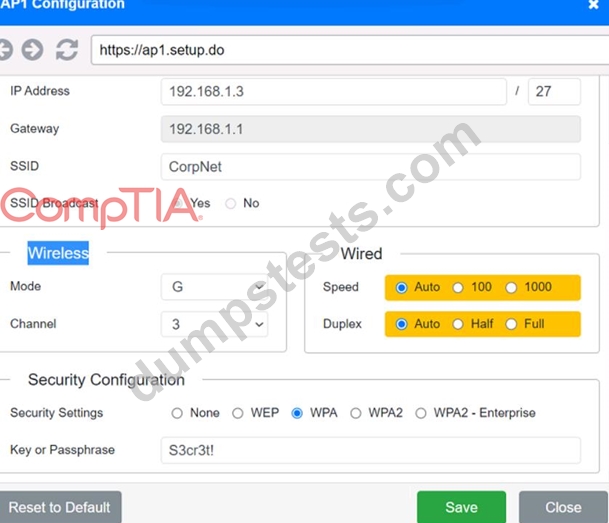
Exhibit 2 as follows
Access Point Name AP2

Exhibit 3 as follows
Access Point Name AP3
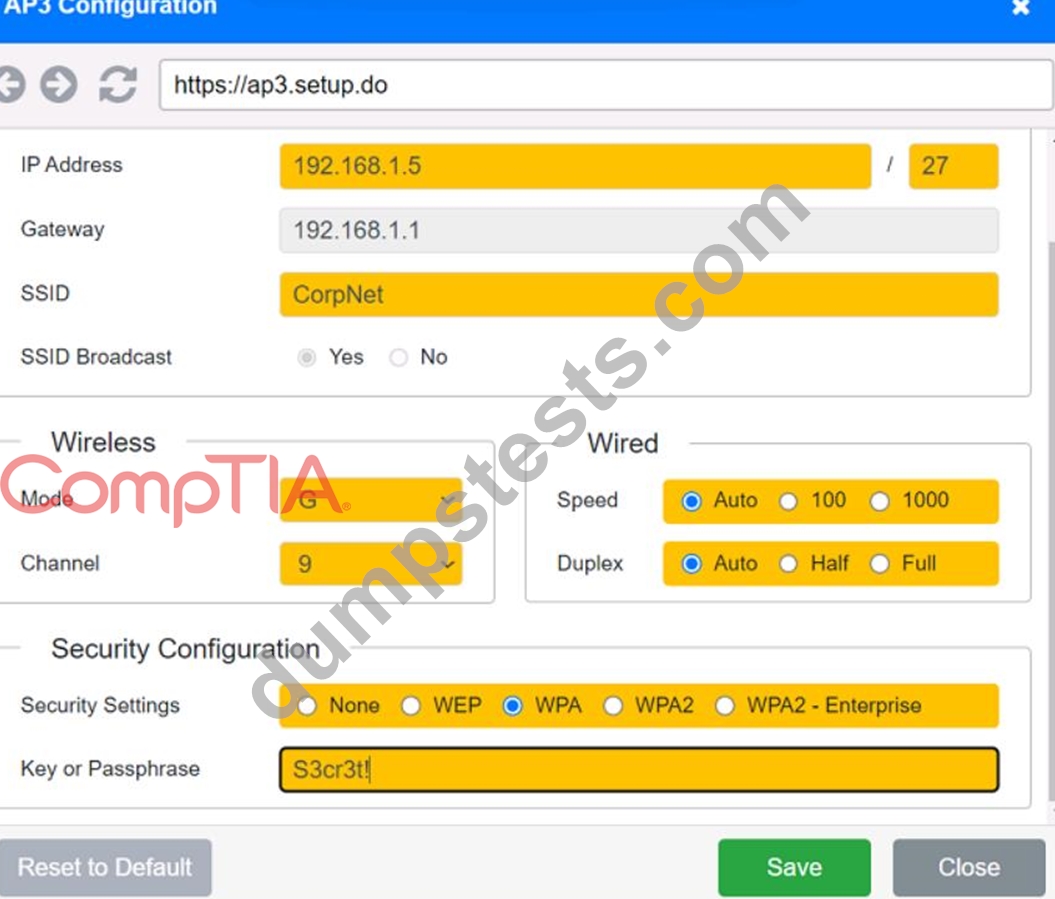
NEW QUESTION # 92
A network technician is troubleshooting a web application's poor performance. The office has two internet links that share the traffic load. Which of the following tools should the technician use to determine which link is being used for the web application?
- A. ping
- B. nslookup
- C. netstat
- D. tracert
Answer: D
Explanation:
Understanding Tracert:
Traceroute Tool: tracert (Windows) or traceroute (Linux) is a network diagnostic tool used to trace the path that packets take from a source to a destination. It lists all the intermediate routers the packets traverse.
Determining Traffic Path:
Path Identification: By running tracert to the web application's destination IP address, the technician can identify which route the traffic is taking and thereby determine which internet link is being used.
Load Balancing Insight: If the office uses load balancing for its internet links, tracert can help verify which link is currently handling the traffic for the web application.
Comparison with Other Tools:
netstat: Displays network connections, routing tables, interface statistics, and more, but does not trace the path of packets.
nslookup: Used for querying DNS to obtain domain name or IP address mapping, not for tracing packet routes.
ping: Tests connectivity and measures round-trip time but does not provide path information.
Implementation:
Open a command prompt or terminal.
Execute tracert [destination IP] to trace the route.
Analyze the output to determine the path and the link being used.
Reference:
CompTIA Network+ study materials on network troubleshooting and diagnostic tools.
NEW QUESTION # 93
A systems administrator is investigating why users cannot reach a Linux web server with a browser but can ping the server IP. The server is online, the web server process is running, and the link to the switch is up. Which of the following commands should the administrator run on the server first?
- A. arp
- B. netstat
- C. traceroute
- D. tcpdump
Answer: B
Explanation:
The netstat command provides information about network connections, routing tables, interface statistics, masquerade connections, and multicast memberships. Running netstat on the server can help the administrator verify that the web server process is listening on the expected port (e.g., port 80 for HTTP or port 443 for HTTPS) and that there are no issues with network connections. This is a crucial first step in diagnosing why the web server is not accessible via a browser.
Reference: CompTIA Network+ study materials.
NEW QUESTION # 94
A network engineer is now in charge of all SNMP management in the organization. The engineer must use a SNMP version that does not utilize plaintext dat a. Which of the following is the minimum version of SNMP that supports this requirement?
- A. v3
- B. v1
- C. v2u
- D. v2c
Answer: A
Explanation:
SNMPv3 is the version of the Simple Network Management Protocol that introduces security enhancements, including message integrity, authentication, and encryption. Unlike previous versions (v1 and v2c), SNMPv3 supports encrypted communication, ensuring that data is not transmitted in plaintext. This provides confidentiality and protects against eavesdropping and unauthorized access.
Reference: CompTIA Network+ study materials.
NEW QUESTION # 95
An organization has a security requirement that all network connections can be traced back to a user. A network administrator needs to identify a solution to implement on the wireless network. Which of the following is the best solution?
- A. Requiring the use of PSKs
- B. Implementing enterprise authentication
- C. Configuring a captive portal for users
- D. Enforcing wired equivalent protection
Answer: B
Explanation:
Enterprise authentication (such as WPA2-Enterprise) utilizes unique credentials for each user, typically integrating with an authentication server like RADIUS. This allows for tracking and logging user activity, ensuring that all connections can be traced back to individual users. PSKs (Pre-Shared Keys) are shared among users and do not provide individual accountability. Captive portals can identify users but are less secure than enterprise authentication, and Wired Equivalent Privacy (WEP) is outdated and not recommended for security purposes.
Reference:
CompTIA Network+ materials highlight enterprise authentication methods as the preferred solution for secure and accountable wireless network access.
NEW QUESTION # 96
......
2025 Valid N10-009 test answers & CompTIA Exam PDF: https://prep4sure.dumpstests.com/N10-009-latest-test-dumps.html